Every conversation has its place
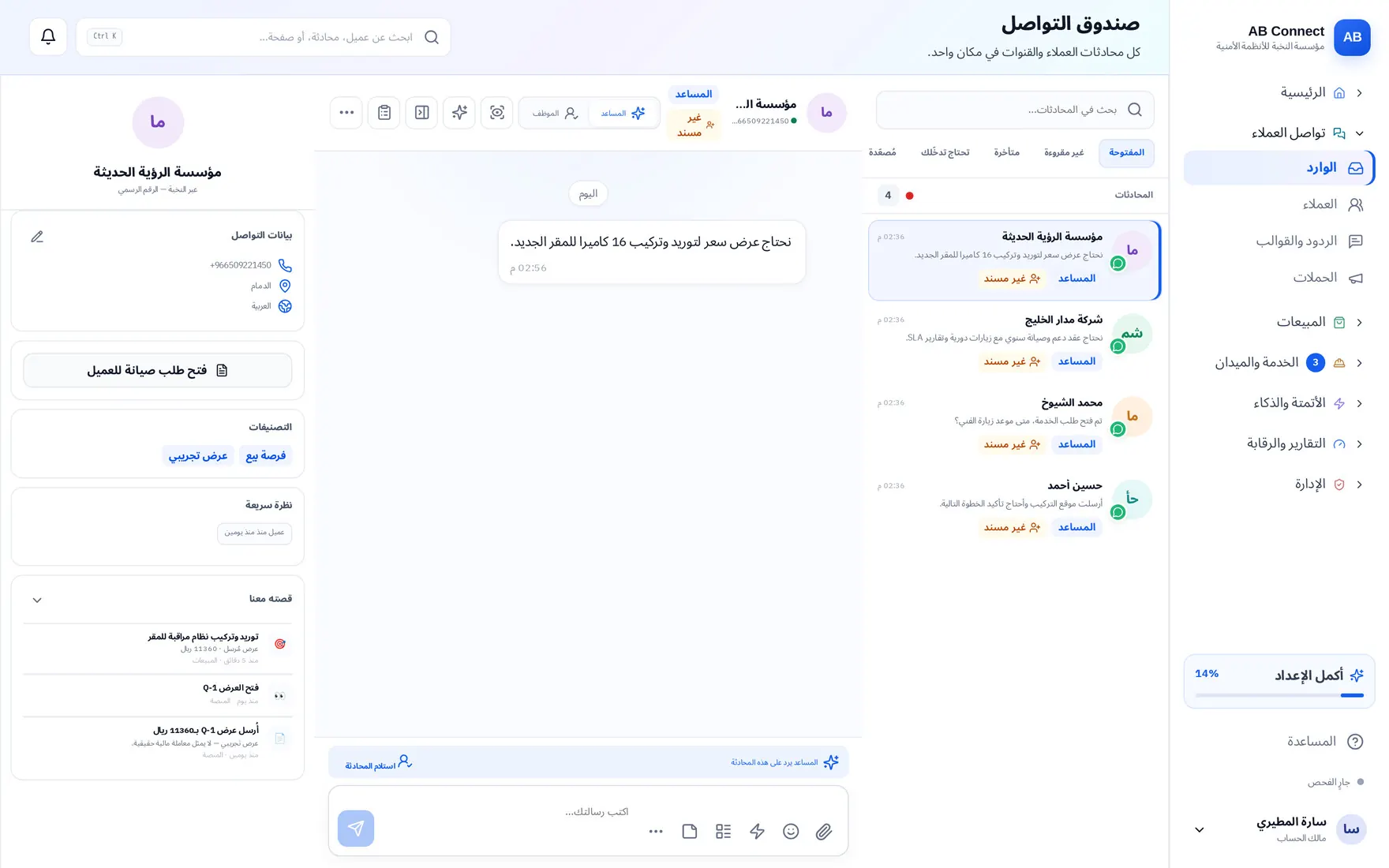
Bring your connected channels together, assign conversations across the team, and keep the customer's context as they move between staff.
- Unified inbox
- Customer profile
- Team assignment
WhatsApp, chat and email in one inbox. An AI agent replies and prices from your catalogue, sends the quote and payment link, and assigns the job to your technician. And you follow everything from one place.
Meta-verified Tech Provider for the WhatsApp Business Platform: an official connection through the WhatsApp Cloud API, with no reliance on unofficial tools that put your number at risk of a ban.
All your conversations in one inbox
Most tools stop at the reply. AB Connect completes the journey: it understands the request, prices it, collects the payment, moves the team and measures the result. And every step follows your rules.
From WhatsApp, chat or email, along with the customer's source and campaign.
Replies from your knowledge, prices from your catalogue, and hands over to a staff member when needed.
A quote that reaches the customer, and a payment link by card or bank transfer.
A service request assigned to a technician, with an appointment and a status everyone can follow.
Reports on sales, response speed and team performance, and the source of every customer.
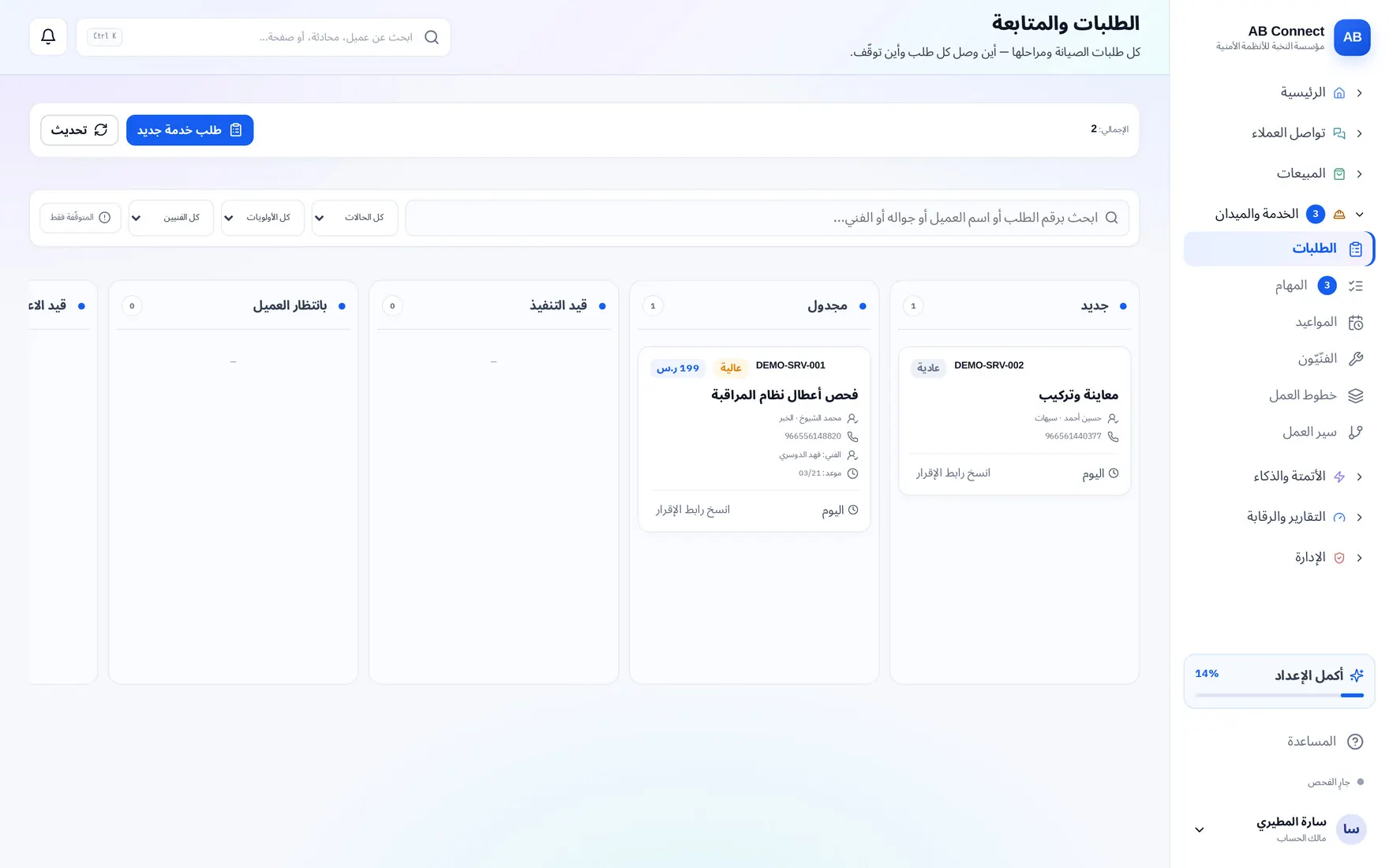
Real screenshots from the platform — names replaced with Alpha Beta for display
When messages, requests and prices are scattered across separate tools, follow-up breaks. AB Connect brings together what the team needs, so each staff member picks up where the other left off.
Bring your connected channels together, assign conversations across the team, and keep the customer's context as they move between staff.
A catalogue of products and services, quotes, WhatsApp campaigns and opportunity follow-up, so your team knows what the customer needs right now.
Requests, tasks, appointments and technician assignment, so you can follow who owns the work and its status from the same workspace.
Choose your agents, prepare their knowledge and set the limits of their work; and review improvement suggestions before they are applied.
Executive reports, team performance and follow-up indicators, with downloadable results and the definition of their sources and periods.
Members, permissions, channels and integrations; control who can reach the tools and data inside your business.
Choose the agents your business needs, and set each one's knowledge, skill, policy, permissions and approver before you enable it.
Replies with knowledge of your business and the conversation's context
Catalogue prices and quotes
What it reads, what it suggests and what it executes
You decide what is enabled and what is approved. Capabilities vary by agent, plan and settings.
A customer fills in your ad form. Within seconds they reach your inbox with their name, number and answers. Your team calls while they are still interested.
On TikTok or Snapchat, without leaving the app.
A new conversation with their name, number and answers, plus the campaign name.
Your staff or your agent follows up from the same conversation.
TikTok and Snapchat send the form only. The messaging itself happens on WhatsApp or by phone.
Whether the customer started from a conversation or an ad form, AB Connect gathers them into one profile and keeps their source and linked campaign, so the team knows how to follow up.
Snapchat campaign form
TikTok campaign form
The conversation or form data comes in through the enabled connection, with the identity of the channel or ad platform.
The source and the campaign or form name stay linked to the customer so you can filter and come back to them, and follow-up starts in the inbox.
The number of customers and deals, the value and the average first response for each campaign, and you open its customers directly.
Many sources, one context: Conversation channels appear according to the connection. Snapchat and TikTok send lead forms, and their follow-up starts inside AB Connect. Ad spend does not come through the form connections, so the platform does not show cost per customer from a guessed number.
For maintenance and property-management companies: every request moves through clear steps, and every step has an owner.
It comes from the conversation, or your staff opens it.
It is assigned to the right technician.
The appointment is booked and everyone can see it.
The technician hands over with photos and a signature, and the supervisor approves.
Issued in Daftra from the same conversation.
You do not leave the conversation to get paid, and you do not copy figures into Daftra by hand.

Send it to the customer, who pays with mada, card or Apple Pay while talking to you.
Issued in Daftra with one click, with anything the customer paid in advance deducted.
Items and prices update every morning, and the agent quotes from them.
You need a Daftra account and a payment provider connected to your business.
Tools that help your team reply faster, without losing a conversation.
The conversation comes back to you at the time you choose.
Assign or close up to 100 conversations in one click.
A summary is written into the conversation at handover and at closing.
Set a reply deadline, and conversations that pass it are flagged to you.
A message inbox receives and replies. AB Connect carries the work on after the reply.
30 days, no card needed.
Start your free trialWhether you sell a product or deliver a service in the field, build a clear path from the customer's question to the next step.
Show catalogue information, prepare the quote and follow the opportunity with your team.
Explore the plans →Turn the need into a request, set the appointment and the technician, and follow the work and the service status.
The service-request journey (in Arabic) →Review business indicators and team performance, and share executive reports with decision-makers.
Explore the reports →Choose your business from more than 40 business types (in Arabic) →
Bring your channels together with store, billing and payment data within your workflow. You connect your business account according to each provider's requirements and the supported capabilities.
Connect the supported commerce data, so the team can refer back to products and orders during follow-up.
Use Daftra data and the supported billing capabilities, while your accounting system remains the source of the tax invoice.

A payment link by mada, card or Apple Pay through Moyasar, inside the conversation.
Connecting requires an account and setup with the provider, and its fees may be separate from the platform subscription.
Prices and usage limits come from the current plans, and they are the same ones the system applies. Try first, and pay when you are convinced.
Approximate, at a fixed exchange rate. Billing is in Saudi riyals.
For the real-estate marketer: every client who messages you in one place, and the agent replies while you're showing a property.
59 / month incl. VAT
590 a year incl. VAT
7 days' trial — no card
For a shop that is starting out and does not want to miss a message
249 / month
207.50 / month
30 days' trial — no card
2,490 billed annually
For a shop that sells and needs its store and books in the inbox
449 / month
374.17 / month
30 days' trial — no card
4,490 billed annually
For a team working with multiple numbers and branches
799 / month
665.83 / month
30 days' trial — no card
7,990 billed annually
Based on your size and needs
By agreement
All channels, integrations, campaigns and automation are in every plan; the difference is in the limits alone. Your staff replies and your customers’ incoming messages are unlimited; the outbound limit covers the agent, campaigns and automation, and you pay Meta’s fees to Meta from your own account. Ready replies (greetings and thanks) do not count toward the agent reply limit. Prices exclude VAT. You can change or cancel your plan at any time. The Broker plan price includes VAT.
Have a different workflow? Tell our team what you need and we will get back to you within one business day.
Talk to us about your business →The connection is official, through Meta's WhatsApp Cloud API, so you do not rely on unofficial tools that put the number at risk of a ban. If your number runs on the WhatsApp Business app today, you can connect it and keep using the app with it, or connect a new number. Meta decides whether a number is eligible and how it is verified, and we go through it with you.
No. Setup happens on Arabic screens: your business details, then connecting the channel through Meta's steps, and the website chat is one line you paste into your site. The setup centre inside the platform shows you the next step.
Yes, with no minimum term. You cancel from the billing screen; your service runs to the end of the paid period, then the subscription is not renewed and nothing more is charged. You can export your conversations and customers before you leave.
AB Connect brings communication, sales and service together in one workspace. You can start with the conversation inbox and the catalogue, then add agents, requests and appointments according to your team's needs and the available plans.
From the knowledge base, the catalogue and the business policies you prepare for it. The agent's settings and permission limits are reviewed before it is enabled, and you review improvement suggestions before they are applied.
No. You choose the agents that suit your work and configure each agent's settings separately. The availability of agents and capabilities depends on your plan and the integrations you have enabled.
Yes, when source data is available. AB Connect keeps the channel or form platform, and the campaign or form name, with the customer, and shows results by platform and campaign covering customers, deals, sales value and average first response. Ad spend does not come through the Snapchat and TikTok form connections, so cost per customer is not calculated in this report.
Reports bring together your account's data for the selected period, with the extraction date and the definition of each indicator. You can download a printable report or spreadsheet data, and data from external systems appears according to their connection and availability.
Review the plan's details and limits before subscribing. Fees from channel and integration providers may be separate from the platform subscription, and connecting each provider is subject to its own terms.
Yes. Choose the right plan and start the trial with no card. The trial length and usage limits for each plan are shown before you complete sign-up.
Create your business's workspace, connect your channel and set up your agent. All before you pay a single riyal.